Bible Gateway Customizer

Customizer Pro

More range. More colors. More bookmarks. A $5 one-time upgrade for your reading space.

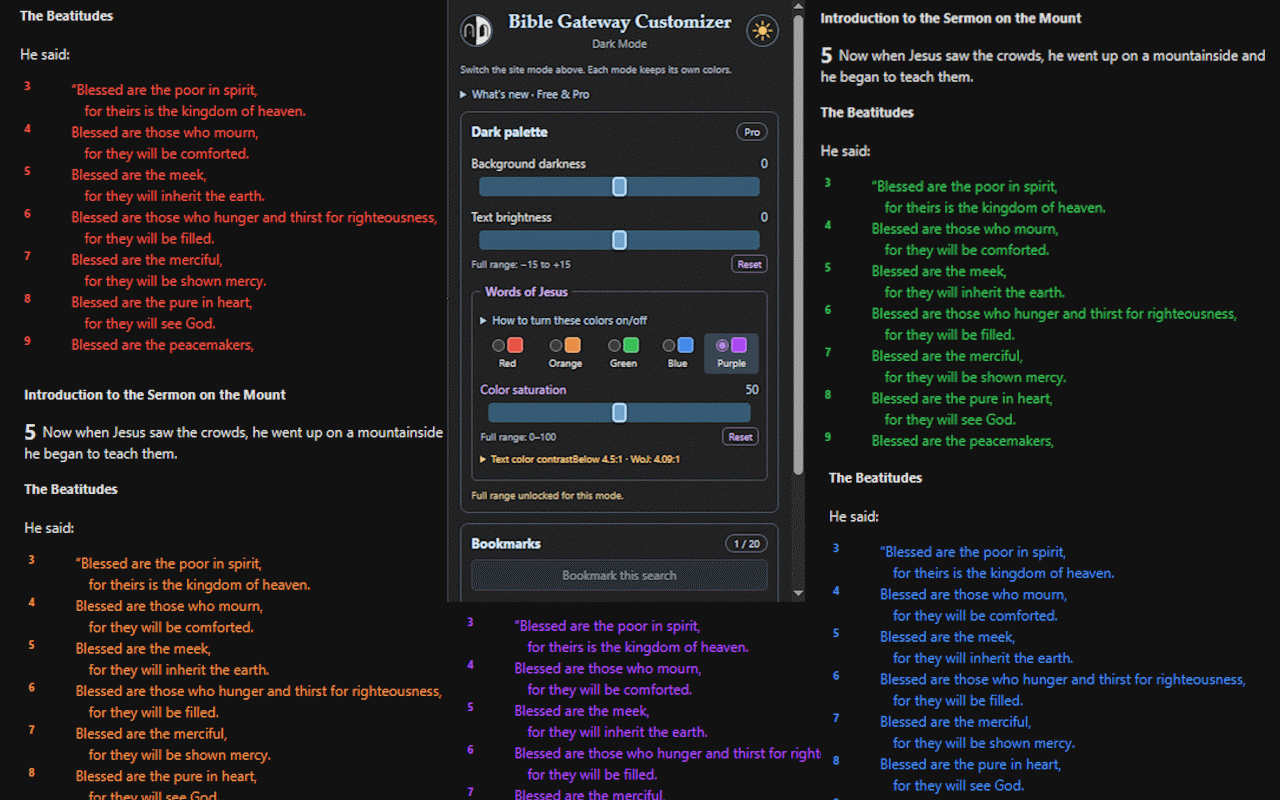
Customizer Pro popup with full slider ranges and examples of all five Words of Jesus colors
Five colors, full slider ranges, and room for 20 bookmarks.

What Pro adds

  • Full adjustment ranges: Go beyond Free's starter limits for background, text, and color saturation in both reading modes.
  • All five Words of Jesus colors: Add green, blue, and purple to Free's red and orange. Bible Gateway's Red Letter setting must be enabled for supported passages and translations.
  • 20 local bookmarks: Save more passage searches and translations, compared with 3 in Free.
  • One license for your computers: No subscription or repeat purchase. Settings and bookmarks remain separate on each browser profile.

Free already includes separate light/dark palettes and starter controls. Compare Free and Pro, including exact slider ranges.

After purchase

  1. Complete payment to reach the thank-you page, where your license key is retrieved.
  2. Copy your key. Check your checkout email inbox and spam folder for a copy, too.
  3. Follow the activation instructions below to unlock Pro in the extension.

Payment does not automatically activate the extension. If its palette badge already says Pro, you are unlocked and do not need to buy again.
Have a key?

Already purchased? You do not need to buy again.

  1. Open Chrome's Extensions menu (the puzzle-piece icon), then choose Bible Gateway Customizer. Older installed versions may still say Bible Gateway Dark Mode.
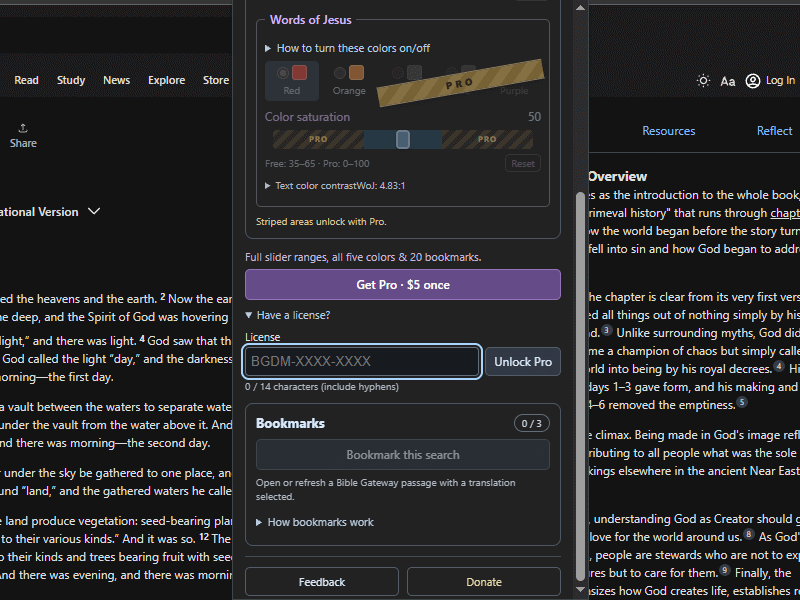
  2. Expand Have a license? below the Get Pro button.
  3. Paste your complete BGDM-XXXX-XXXX code into the License field, then click Unlock Pro.
  4. Check the palette badge: if it says Pro, Pro is already unlocked. The purchase/license section is hidden and no further payment is needed.

Enter the key in the browser extension, not on this website. Free users also have sliders and color controls; the Pro badge confirms your upgrade.

Keep your key for future reinstalls or use on another computer. Your license does not synchronize bookmarks or settings between computers.

Can't find your key? Check your checkout email inbox and spam folder, or contact support with your checkout email and purchase date. Do not send card details.

The extension's expanded Have a license panel, with an empty License field and Unlock Pro button
Enter your key in the extension's License field, then choose Unlock Pro.

Free and Pro

Start free. Add more choices with Pro.

Choose the amount of customization you need.
FeatureFreePro
Separate light/dark palettesIncludedIncluded
Background, text, and saturation controlsStarter rangesFull ranges
Words of Jesus colorsRed and orangeRed, orange, green, blue, and purple
Local passage bookmarks320
PriceFree$5 once
See the exact slider ranges
Slider positions, not percentages of screen brightness.
ControlFreePro
Dark background darkness−5 to +5−15 to +15
Dark text brightness−5 to +5−15 to +15
Light background lightness−5 to +5−15 to +15
Light text darkness+5 to +15−15 to +15
Color saturation35–650–100

Both tiers see the full slider rails. Striped areas and the Pro ribbon identify choices that require Pro.